Trust overdrafts are rejected at the database level
A constraint trigger refuses any posting that would overdraw a trust matter, whichever screen or report attempted it.
Ligne Practice Management
Ligne is a modular practice-management platform built around the financial and operational requirements of South African legal practice. Trust and business funds stay separate, overdrafts are refused by the database, and every financial event leaves a permanent record.
| Entry | Amount (ZAR) | Balance |
|---|---|---|
| Deposit | 20 000.00 | 20 000.00 |
| Payment | −7 500.00 | 12 500.00 |
| Available in trust | 12 500.00 |
Twenty-four areas share one matter, one ledger and one audit trail. Pick an area to read more.
Receipts, payments, transfers and per-matter trust ledgers, with overdrafts refused by the database.
User manualGeneral ledger, VAT, fee notes, creditors and disbursements.
User manualReconcile bank statements against the trust and business ledgers.
User manualTrust reconciliations each month, and period close that blocks late postings.
User manualA workspace for every matter: parties, notes, deadlines and financial history together.
User manualContact records with roles per matter and South African address look-up.
User manualMatter tasks and follow-ups in one work queue, including tasks raised from email.
User manualMatter file storage, a document type for every file, PDF conversion and a pleading generator driven by Word templates and matter data.
User manualMatter-linked mailbox and correspondence, with scheduled send.
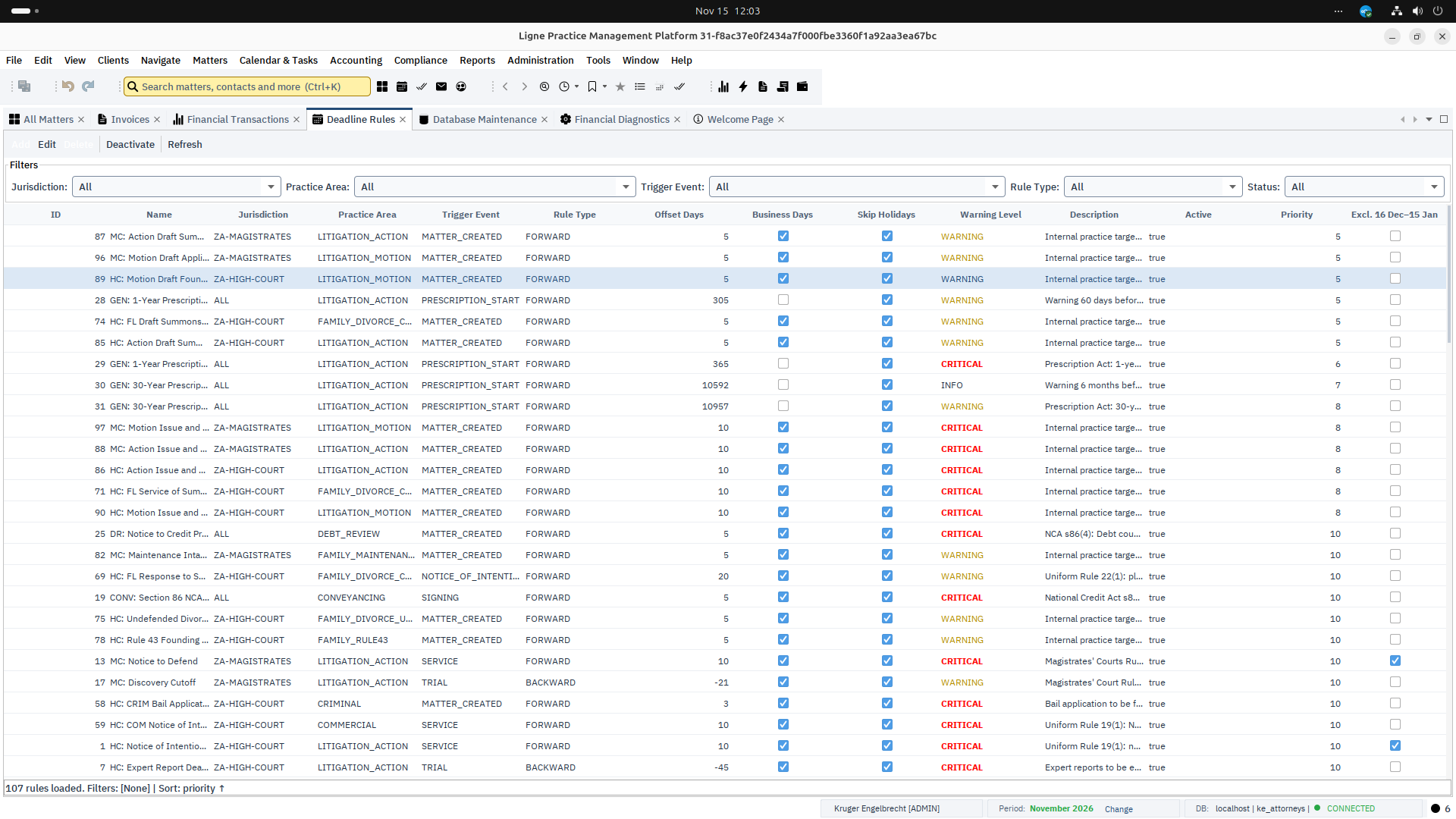
User manualShared diaries and rule-based litigation and conveyancing deadlines.
User manualCollect money owed to your clients: debtor ledger, payment plans, judgments and enforcement.
User manualSouth African payroll, payruns and SARS outputs including EMP201, EMP501 and IRP5.
User manualA guarded transfer pipeline with dated transfer duty, clearances, guarantees, FICA, purchaser and seller statements and a payout checklist.
User manualCompile recoverable costs into a versioned bill for taxation, with tariff codes, taxation results and a printable PDF.
User manualEntity tracking, compliance items and CIPC reports for corporate clients.
User manualA matter-scoped evidence register with timelines and bundles for litigation.
User manualTrust, financial and SARS reports, including LPC reporting for the firm.
User manualCase analytics with KPI tiles and tabbed reports, and a practice snapshot on the welcome screen.
User manualOne search box in the toolbar across matters, contacts and invoices, extended by each module.
User manualExcel workbooks for contacts, clients and matters, with a dry run before anything is written.
User manualCapture general ledger and trust opening balances once, as a single transaction, when you go into production.
User manualRoles, permissions and overrides, checked at the window and again in the service layer.
User manualDock, float and maximise windows across monitors, with your layout remembered.
User manualSigned updates delivered module by module from a site the firm controls.
User manualWhere a generic accounting package relies on users following procedure correctly, Ligne’s primary controls are systemic: they sit in the database and the posting engine, not in a checklist.
The aim is to make certain kinds of accounting error structurally difficult or impossible, rather than merely warning the user about them.
Every financial event is written together to the general ledger, the relevant matter ledger and an immutable audit trail. Corrections are made only by reversing or adjusting entries. Original history is never overwritten.
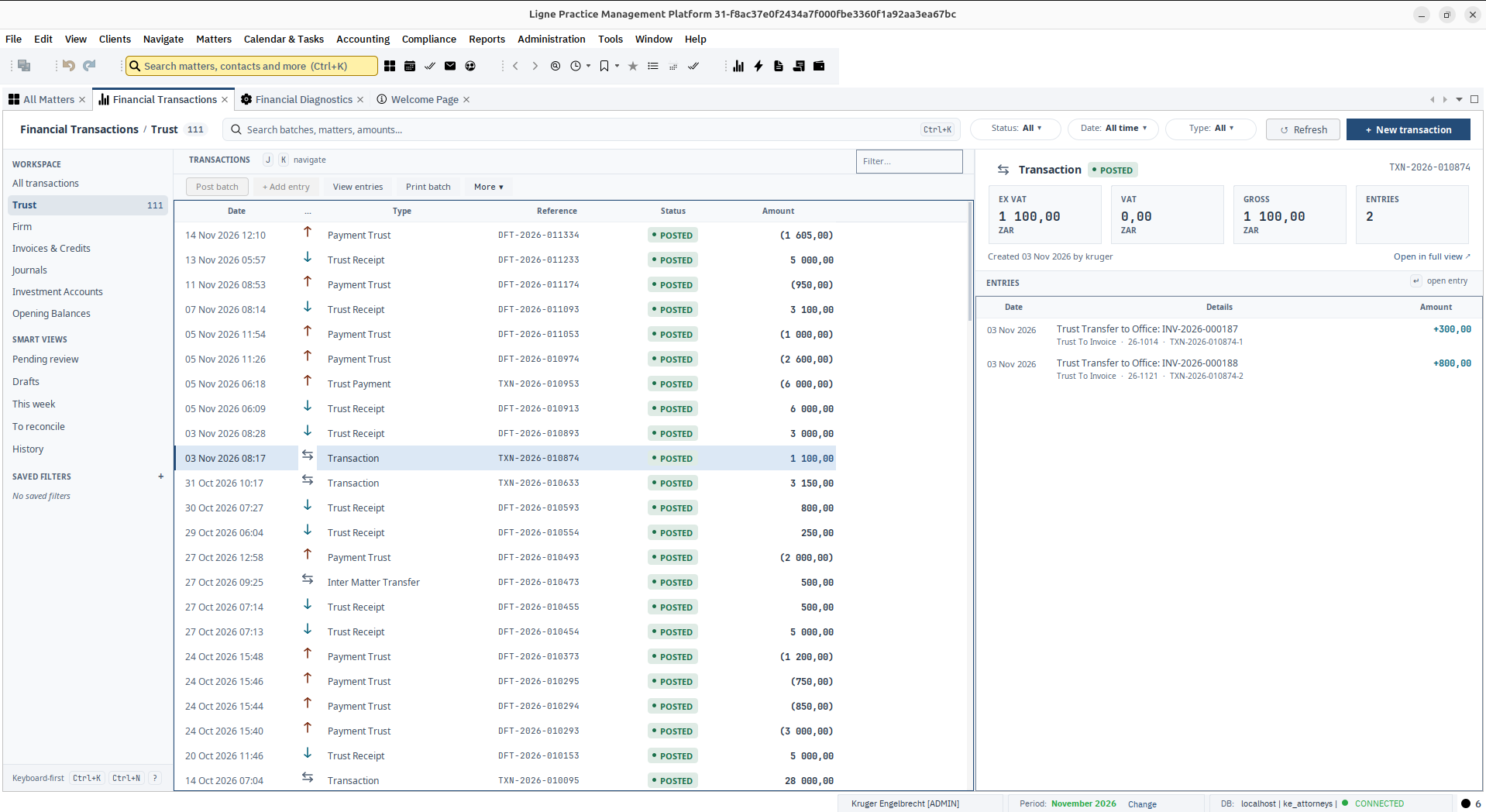
The layers above make the application maintainable. The layer below makes it dependable: a constraint trigger rejects any posting that would overdraw a trust matter before it can be committed.
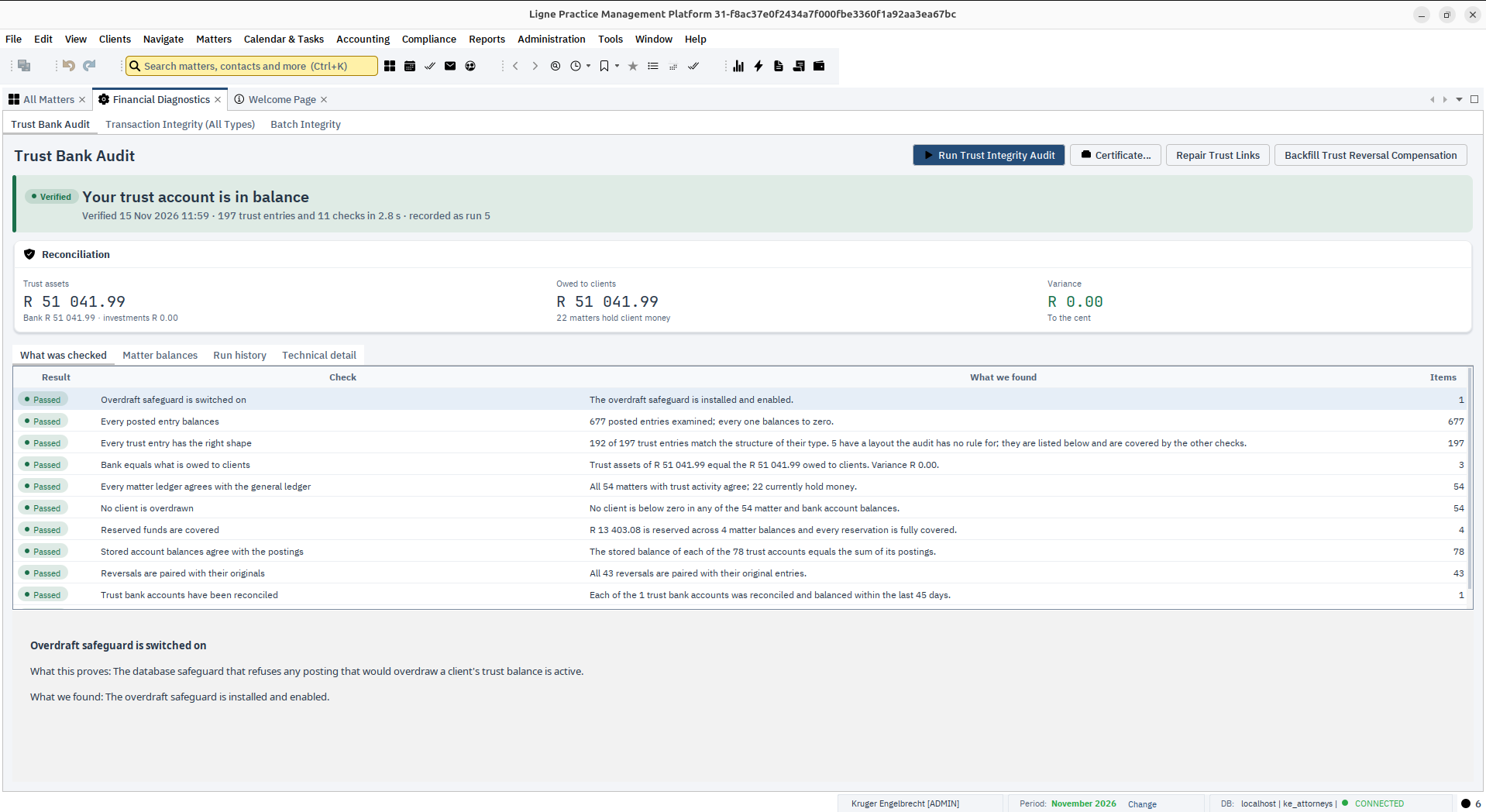
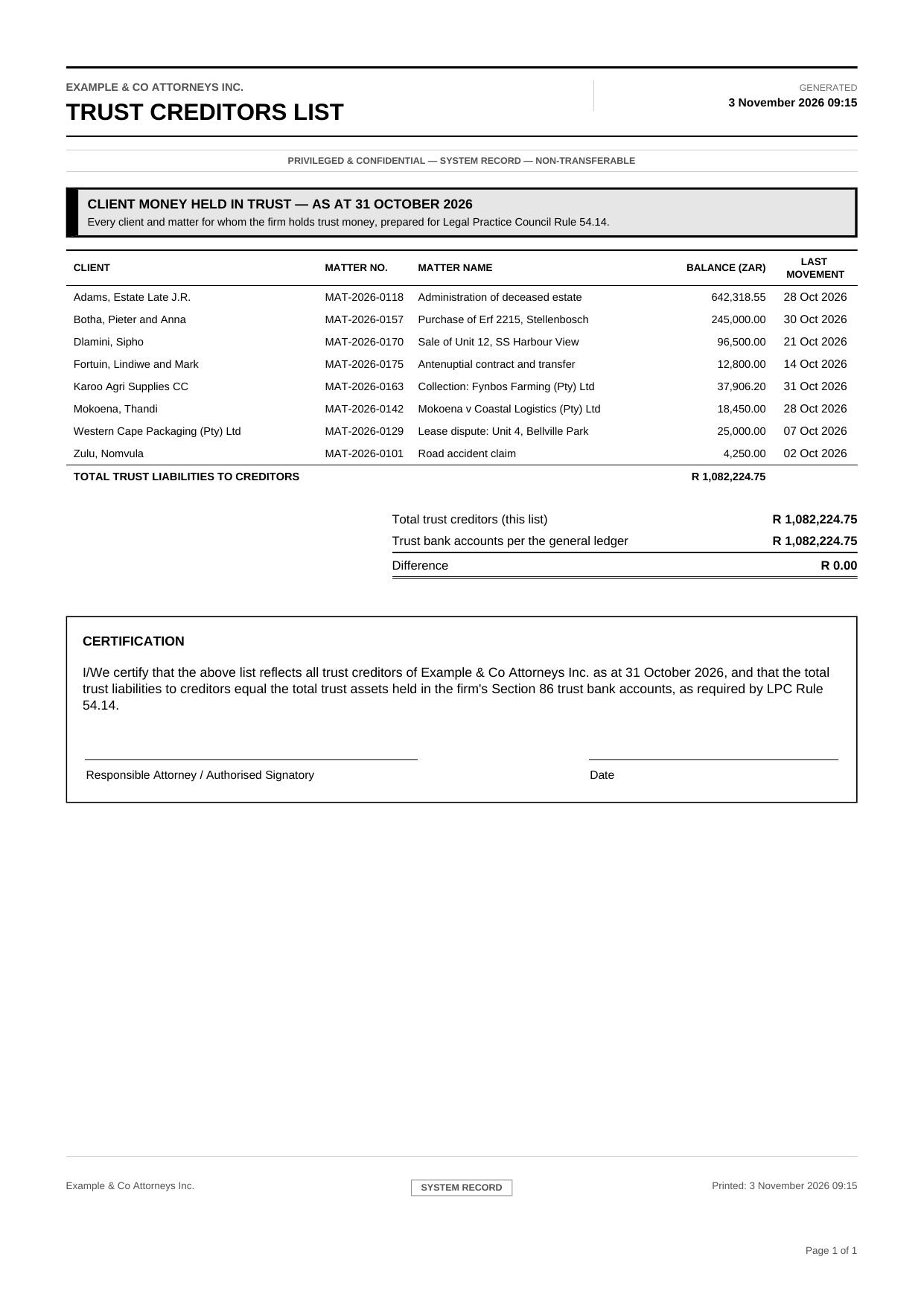
The Trust Bank Audit runs a fixed list of independent checks in seconds: the overdraft safeguard is on, every posted entry balances, each trust entry has the shape its type requires, the bank equals what is owed to clients, and every matter’s trust ledger agrees with the general ledger to the cent. It also looks for overdrawn clients, reservations that are not covered, stored balances that have drifted, reversals that are not paired, bank accounts that have not been reconciled lately, and trust postings that name no matter.
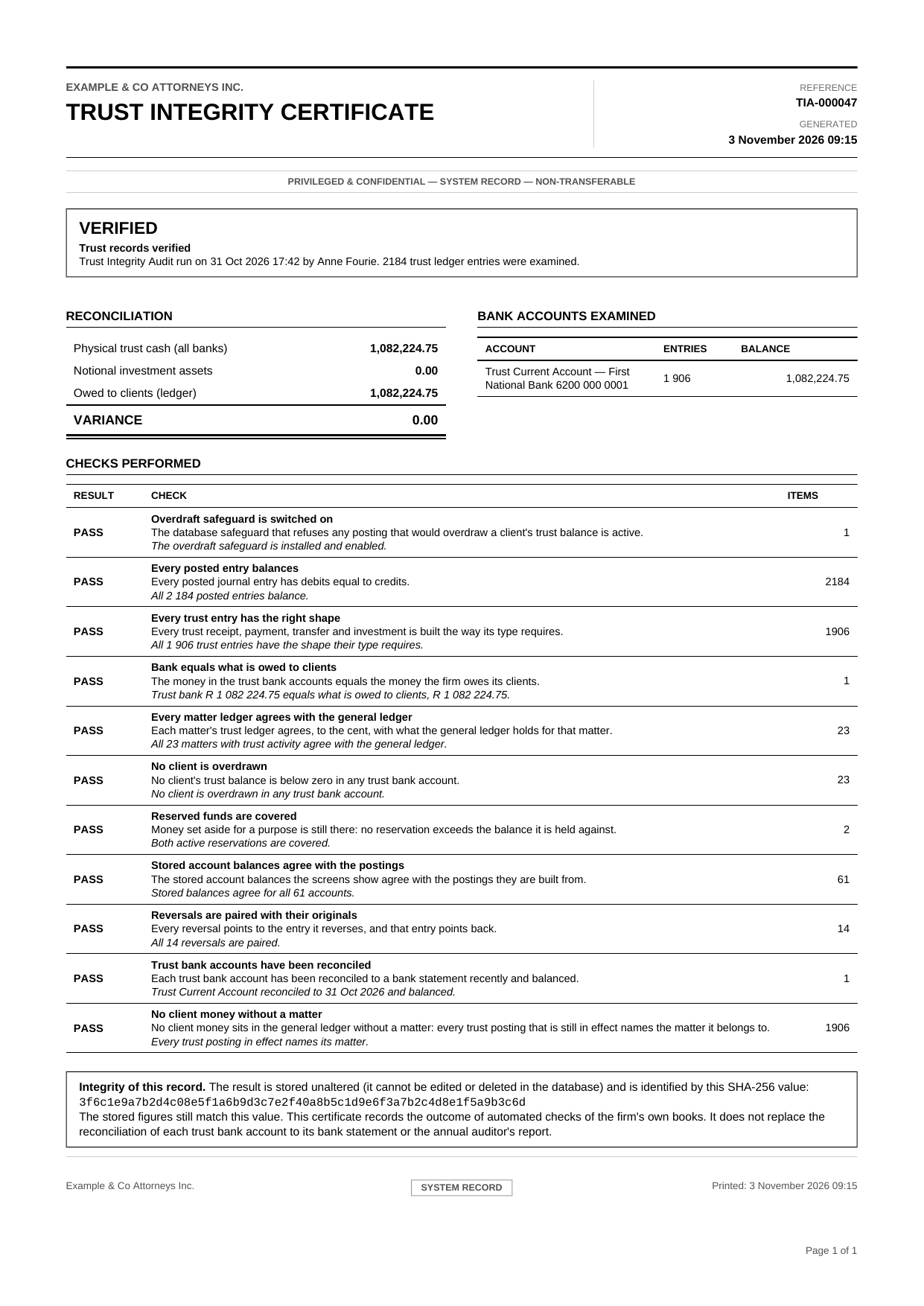
The result is a plain verdict, with the claim each check proves and what it found. Each run is saved unaltered, shown as “last verified” on the dashboard, the matter overview, the client screen and at sign-in, and can be printed as a Trust Integrity Certificate.
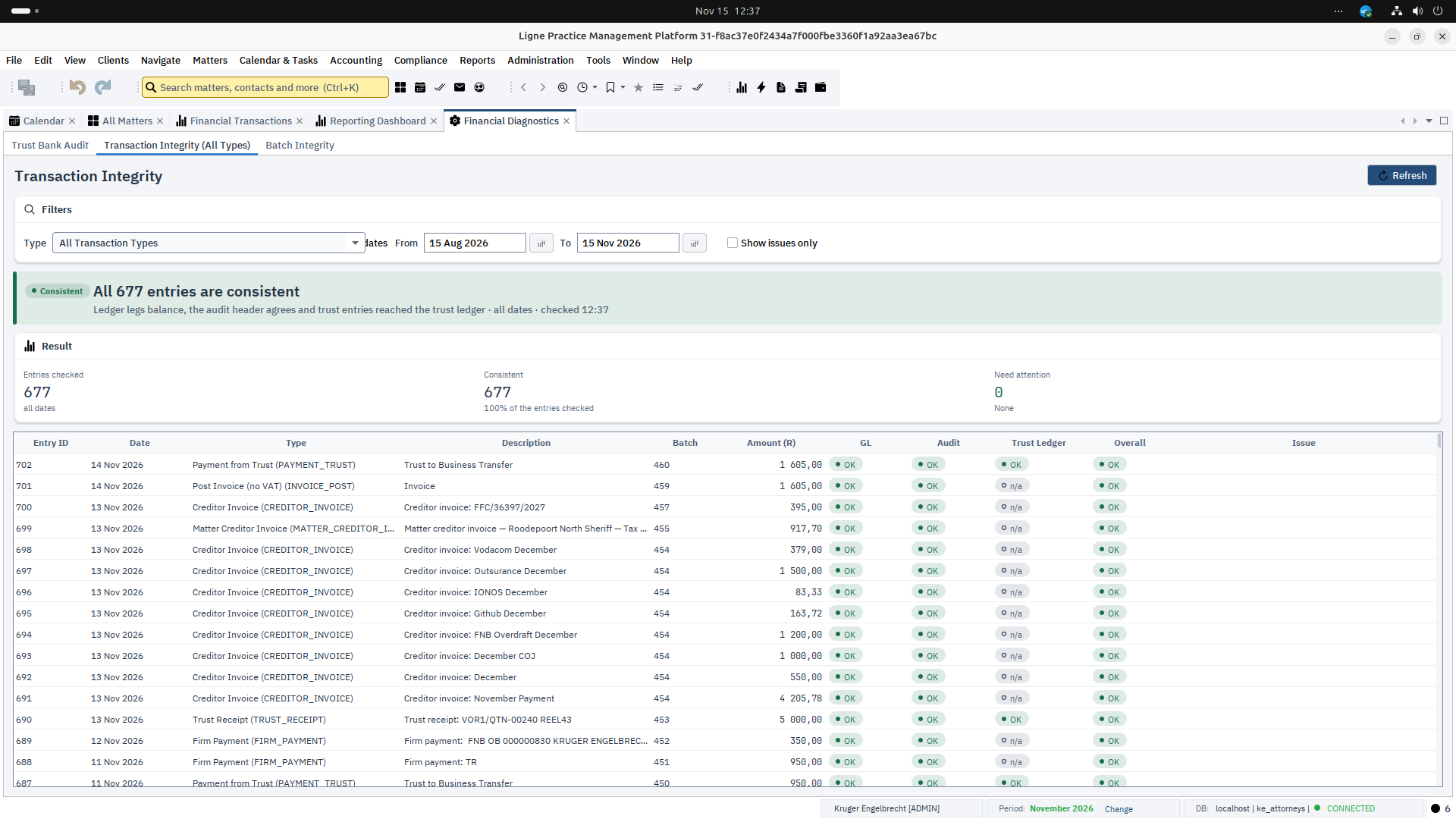
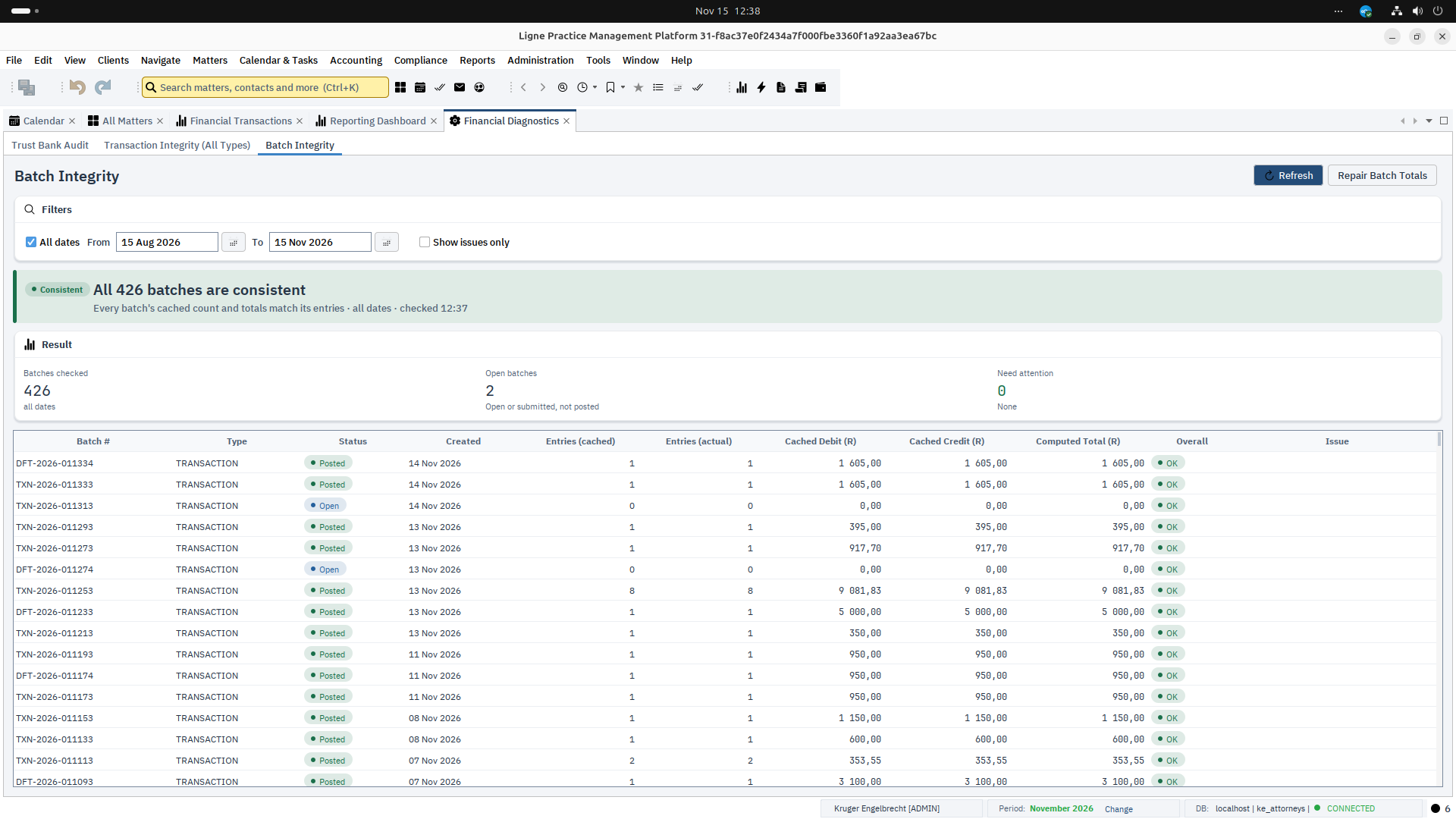
Transaction Integrity checks every posted entry: its ledger legs balance, its audit header agrees with what was actually posted, and a trust entry reached the matter’s trust ledger. Batch Integrity compares each posting batch’s recorded count and totals with the entries it really holds, and can correct a batch that has drifted.
Both give an outcome you can read at a glance, the figures behind it, and the first problem by name when there is one.
Every transaction becomes balanced journal entries. These examples show the most common transactions, deliberately simplified.
The firm raises a fee note for R10 000.00 plus 15% VAT. Revenue and VAT owed to SARS are separated at the moment of posting, so the VAT return is built from the ledger, not reconstructed afterwards.
| Account | Debit | Credit |
|---|---|---|
| 1. Fee note FN-2041: fees, excluding VAT | ||
| 1300 Accounts Receivable | 10 000.00 | |
| 4100 Professional Fees | 10 000.00 | |
| 2. Fee note FN-2041: VAT | ||
| 1300 Accounts Receivable | 1 500.00 | |
| 2300 VAT Output Account | 1 500.00 | |
| Total | 11 500.00 | 11 500.00 |
One check shown. Debits equal credits at R11 500.00. The engine confirms this and far more before anything is committed.
Counsel’s invoice arrives for a specific matter. The firm now owes the creditor, and the cost is held as a recoverable disbursement against that matter until it is billed on.
| Account | Debit | Credit |
|---|---|---|
| 1. Matter creditor invoice: counsel’s fee | ||
| 1320 Disbursements Recoverable | 6 900.00 | |
| 2200 Accounts Payable | 6 900.00 | |
| Total | 6 900.00 | 6 900.00 |
One check shown. Debits equal credits at R6 900.00. The engine confirms this and far more before anything is committed.
When the client has money in trust for the matter, the creditor can be paid directly from it. The first posting is a real trust disbursement. The second discharges the payable and uses up the recoverable disbursement recorded when the invoice arrived, because the client’s own money bore the cost. Nothing passes through the operating account, and no VAT is added to a cost the client’s trust money has already settled.
| Account | Debit | Credit |
|---|---|---|
| 1. Trust payment to creditor | ||
| 2100 Trust Liability (client) | 6 900.00 | |
| 1100 Trust Bank Account | 6 900.00 | |
| 2. Creditor invoice settled from trust | ||
| 2200 Accounts Payable | 6 900.00 | |
| 1320 Disbursements Recoverable | 6 900.00 | |
| Total | 13 800.00 | 13 800.00 |
One check shown. Debits equal credits at R13 800.00. The engine confirms this and far more before anything is committed.
One trust check shown. Available R20 000.00 covers R6 900.00, leaving R13 100.00. The database enforces this independently of the screen.
One billing check shown. If the cost was already billed to the client on an invoice, the payment from trust is refused, because that invoice has already used up the recoverable amount. Pay the creditor from the operating account and apply the client’s trust funds to the invoice instead.
Counsel’s account and the sheriff’s fees are still to come, but the money is already in trust. An attorney places a hold on part of the matter’s balance, with a note saying why. The hold posts nothing: the trust balance is unchanged, but the held amount can no longer be spent, swept to the business account or applied to an invoice until it is released or used to pay that cost.
| Item | Amount |
|---|---|
| Held in trust for the matter | 20 000.00 |
| Reserved: counsel’s fee (expected invoice) | 6 900.00 |
| Reserved: sheriff’s fees | 1 500.00 |
| Available to spend | 11 600.00 |
No journal entries. A reservation changes what is available, never the general ledger, the matter ledger or the bank reconciliation.
One trust check shown. A transfer of R12 000.00 to the business account is refused: only R11 600.00 is available. When counsel’s invoice arrives, paying it from trust can use the reservation, and any remainder can be released in the same step. The database enforces this independently of the screen.
The client owes fee note FN-2041 (R11 500.00) and has the funds in trust. The transfer pays the invoice from trust: money leaves trust, arrives in the operating account, and the receivable is cleared in the same transaction.
| Account | Debit | Credit |
|---|---|---|
| 1. Trust to business transfer | ||
| 2100 Trust Liability (client) | 11 500.00 | |
| 1100 Trust Bank Account | 11 500.00 | |
| 2. Payment from trust: FN-2041 | ||
| 1200 Operating Bank Account | 11 500.00 | |
| 1300 Accounts Receivable | 11 500.00 | |
| Total | 23 000.00 | 23 000.00 |
One check shown. Debits equal credits at R23 000.00. The engine confirms this and far more before anything is committed.
One trust check shown. Available R20 000.00 covers R11 500.00, leaving R8 500.00. The database enforces this independently of the screen.
A sweep finds open invoices whose matters hold trust funds and stages one draft for each in a single batch. Each matter’s available funds, after any reserved amounts, are shared across its invoices and never over-allocated. Nothing posts until a person reviews the batch.
| Invoice | Balance due | Trust available | Staged |
|---|---|---|---|
| Matter A · INV-A1 | 9 200.00 | 15 000.00 | 9 200.00 |
| Matter A · INV-A2 | 8 050.00 | 5 800.00 | 5 800.00 |
| Matter B · INV-B1 | 11 500.00 | 4 000.00 | 4 000.00 |
| Matter C · INV-C1 | 3 450.00 | 0.00 | Skipped |
| Batch total | 19 000.00 |
| Account | Debit | Credit |
|---|---|---|
| 1. Batch total: trust liabilities, three matters | ||
| 2100 Trust Liability (client) | 19 000.00 | |
| 1100 Trust Bank Account | 19 000.00 | |
| 2. Batch total: receivables cleared | ||
| 1200 Operating Bank Account | 19 000.00 | |
| 1300 Accounts Receivable | 19 000.00 | |
| Total | 38 000.00 | 38 000.00 |
One check shown. Debits equal credits at R38 000.00. The engine confirms this and far more before anything is committed.
The client pays fee note FN-2042 by EFT into the firm’s operating account. The bank balance rises and the receivable falls by the same amount, so the debtors’ ledger and the invoice always agree.
| Account | Debit | Credit |
|---|---|---|
| 1. Direct payment: FN-2042 | ||
| 1200 Operating Bank Account | 4 600.00 | |
| 1300 Accounts Receivable | 4 600.00 | |
| Total | 4 600.00 | 4 600.00 |
One check shown. Debits equal credits at R4 600.00. The engine confirms this and far more before anything is committed.
On a collections matter the debtor pays R8 000.00 into trust. The money is held for the client, and the same transaction mirrors it into the debtor ledger as unallocated suspense. It reduces the debt only when it is allocated, in order, across the ledger buckets.
| Bucket | Owing | Applied | Remaining |
|---|---|---|---|
| Costs | 1 500.00 | 1 500.00 | 0.00 |
| Interest | 600.00 | 600.00 | 0.00 |
| Capital | 10 000.00 | 5 900.00 | 4 100.00 |
| Total | 12 100.00 | 8 000.00 | 4 100.00 |
| Account | Debit | Credit |
|---|---|---|
| 1. Trust receipt from debtor, held for the client | ||
| 1100 Trust Bank Account | 8 000.00 | |
| 2100 Trust Liability (client) | 8 000.00 | |
| Total | 8 000.00 | 8 000.00 |
One check shown. Debits equal credits at R8 000.00. The engine confirms this and far more before anything is committed.
When the firm settles the same creditor from its own funds instead, the payable is discharged against the operating bank account. Trust money is never involved.
| Account | Debit | Credit |
|---|---|---|
| 1. Creditor payment | ||
| 2200 Accounts Payable | 6 900.00 | |
| 1200 Operating Bank Account | 6 900.00 | |
| Total | 6 900.00 | 6 900.00 |
One check shown. Debits equal credits at R6 900.00. The engine confirms this and far more before anything is committed.
Illustrative amounts and references, simplified for explanation. Real postings are subject to many more checks than are shown, and entries vary with each firm’s setup. Entries follow the platform’s standard posting templates and chart of accounts. VAT is shown at 15%.
A constraint trigger refuses any posting that would overdraw a trust matter, whichever screen or report attempted it.
The general ledger, the matter ledger and the audit trail are written together, so they cannot silently diverge.
Legal and accounting requirements are addressed at the point of transaction, not reconstructed in reports afterwards.
Mature technology chosen to stay maintainable, keeping historical records accessible beyond any single release.
Each matter is a complete workspace. Select one and every other window follows it.
Trust and business accounting, general ledger, receipts, payments, trust transfers, VAT, fee notes priced from tariff scales and fee-earner rates, disbursements, reserved trust funds, trust interest and bank reconciliation.
Clients, related parties, correspondence, documents, financial history, notes, tasks, deadlines, court appearances, evidence and email, all linked to the matter.
Document management, calendaring and shared diaries that can sync to Nextcloud, workflow deadlines, email integration, full-text search, a global search bar (Ctrl+K) with Back, Forward, recently viewed and pinned records, payroll and debt recovery.
Bills of costs, conveyancing with its transfer finances, CIPC and company secretarial compliance, and debtor and collections management.
A synchronised folder chosen per workstation. Nextcloud is preferred and detected automatically. OneDrive, Google Drive, Dropbox or a network share also work.
Pleadings generated from Word templates and matter data. The firm’s own templates live in a shared “Document Templates” folder. Word documents convert to PDF with the LibreOffice installed on the workstation.
Trust creditors list, trust bank reconciliation, trust integrity certificate, Section 86 and Section 78 reports, Fidelity Fund certificate register and annual trust auditor’s reports.
EMP201, EMP501, IRP5, IT3(a), PAYE, UIF, SDL, Employment Tax Incentive and medical tax credits.
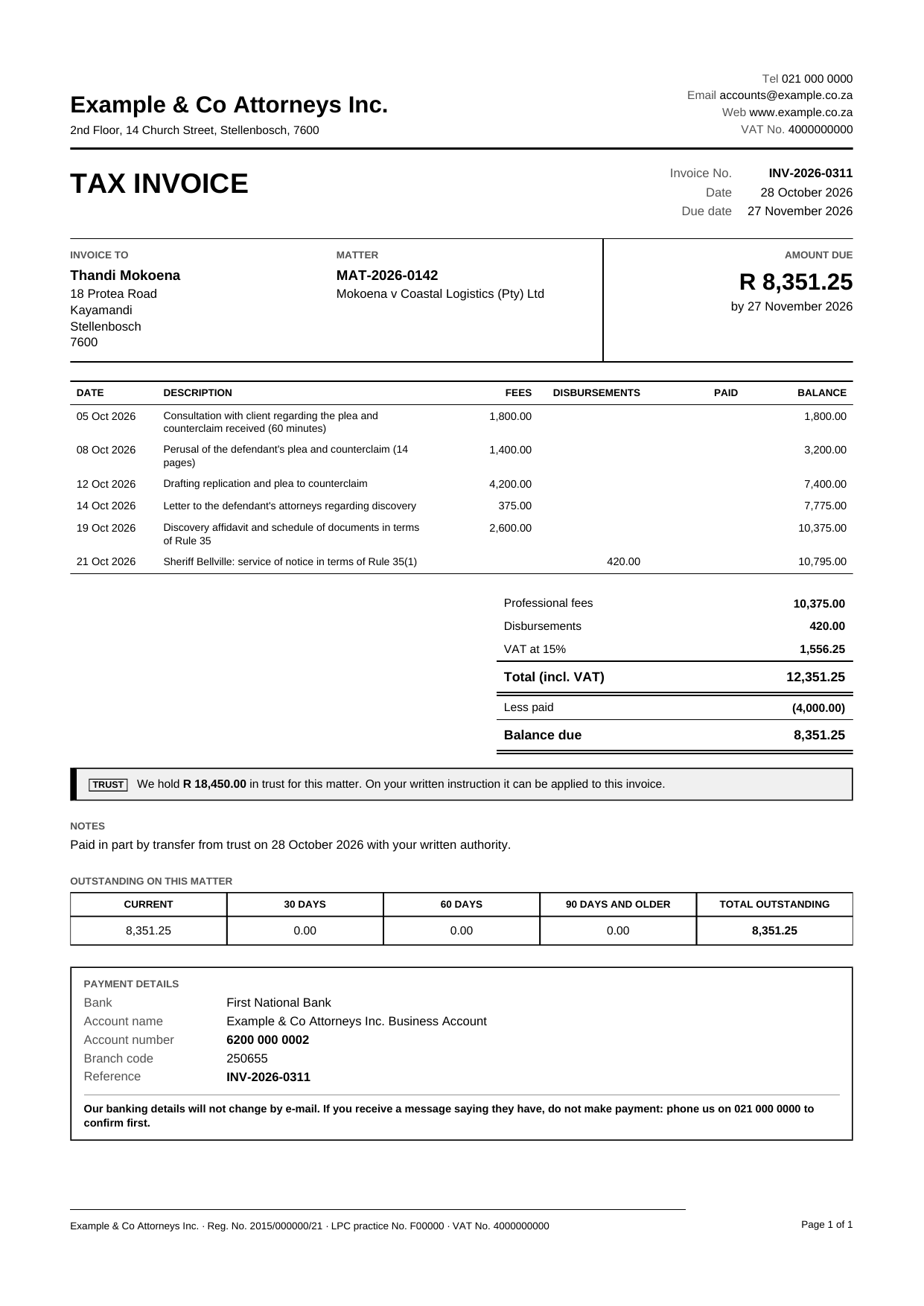
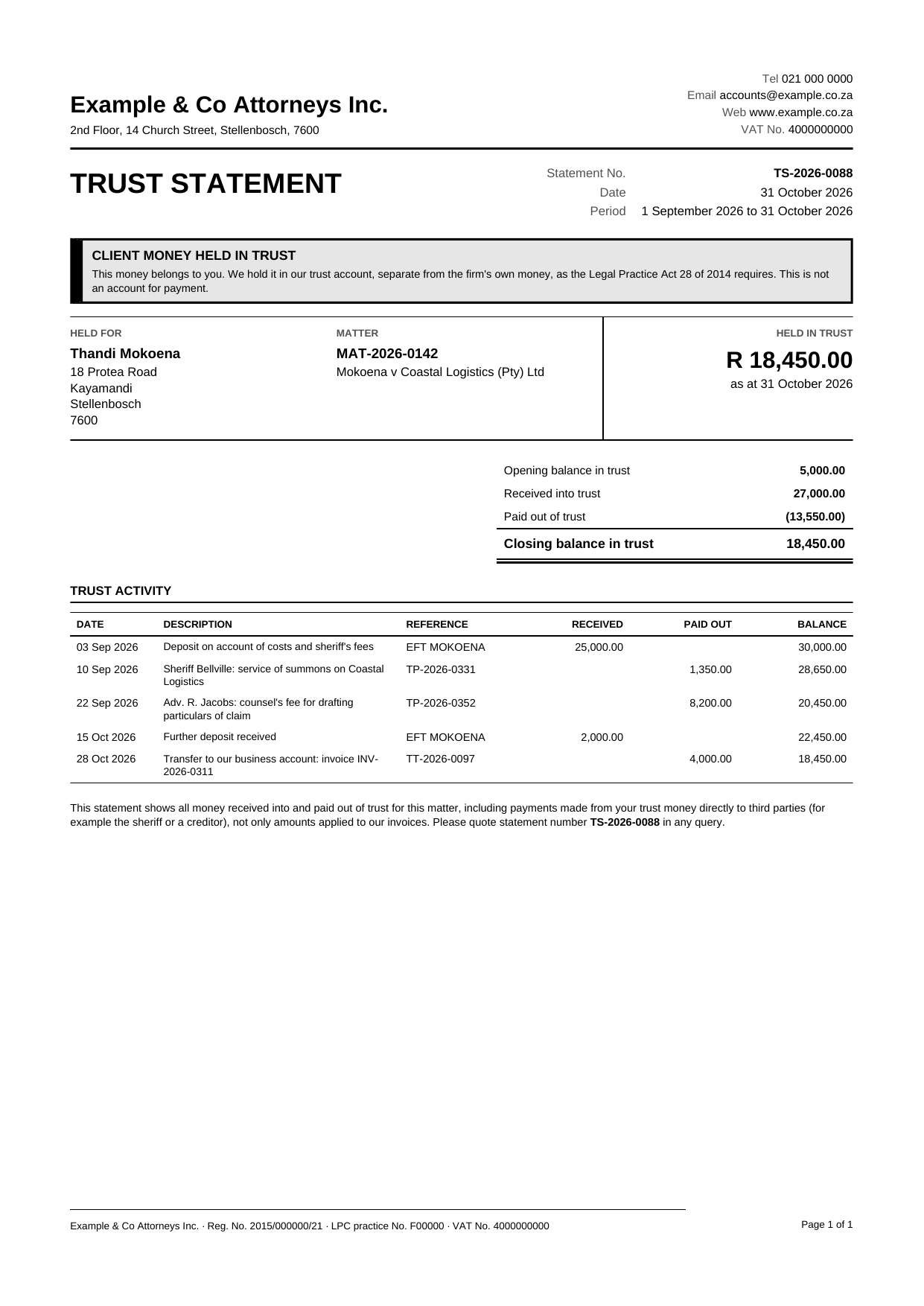
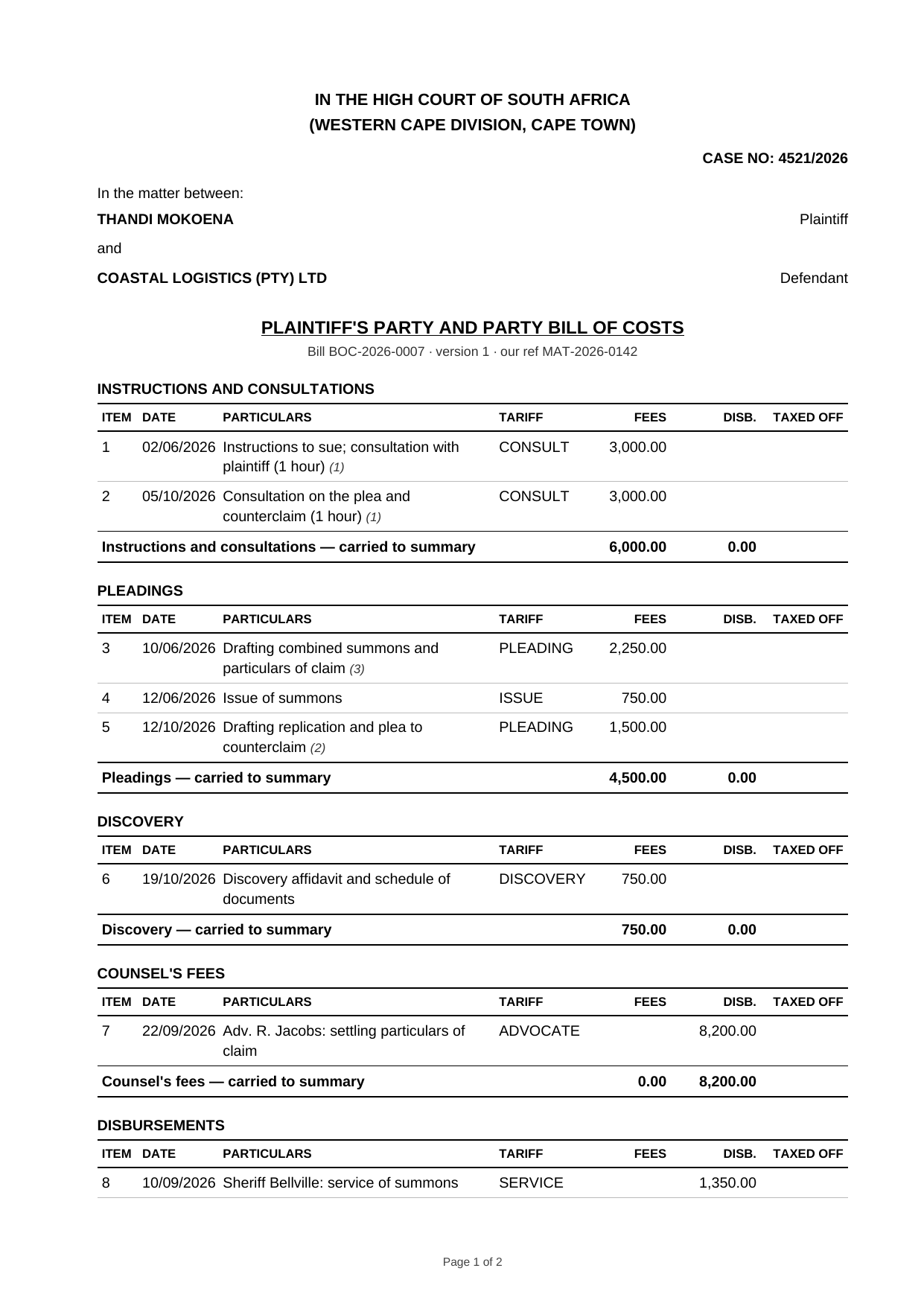
Preparing a bill of costs means finding every recoverable item on the file and presenting it the way a taxing master expects. Ligne compiles the bill from the matter’s own records and keeps your editing separate from the accounting. Compiling a bill never changes the ledgers.
| Item | Amount | Taxed |
|---|---|---|
| Pleadings | ||
| Drafting particulars of claim | 4 200.00 | 3 800.00 |
| Consultations | ||
| Consultation with client | 1 800.00 | 1 800.00 |
| Counsel Fees | ||
| Counsel’s fee for trial | 15 000.00 | 12 000.00 |
| Disbursements | ||
| Sheriff’s fees | 950.00 | 950.00 |
| Total | 21 950.00 | 18 550.00 |
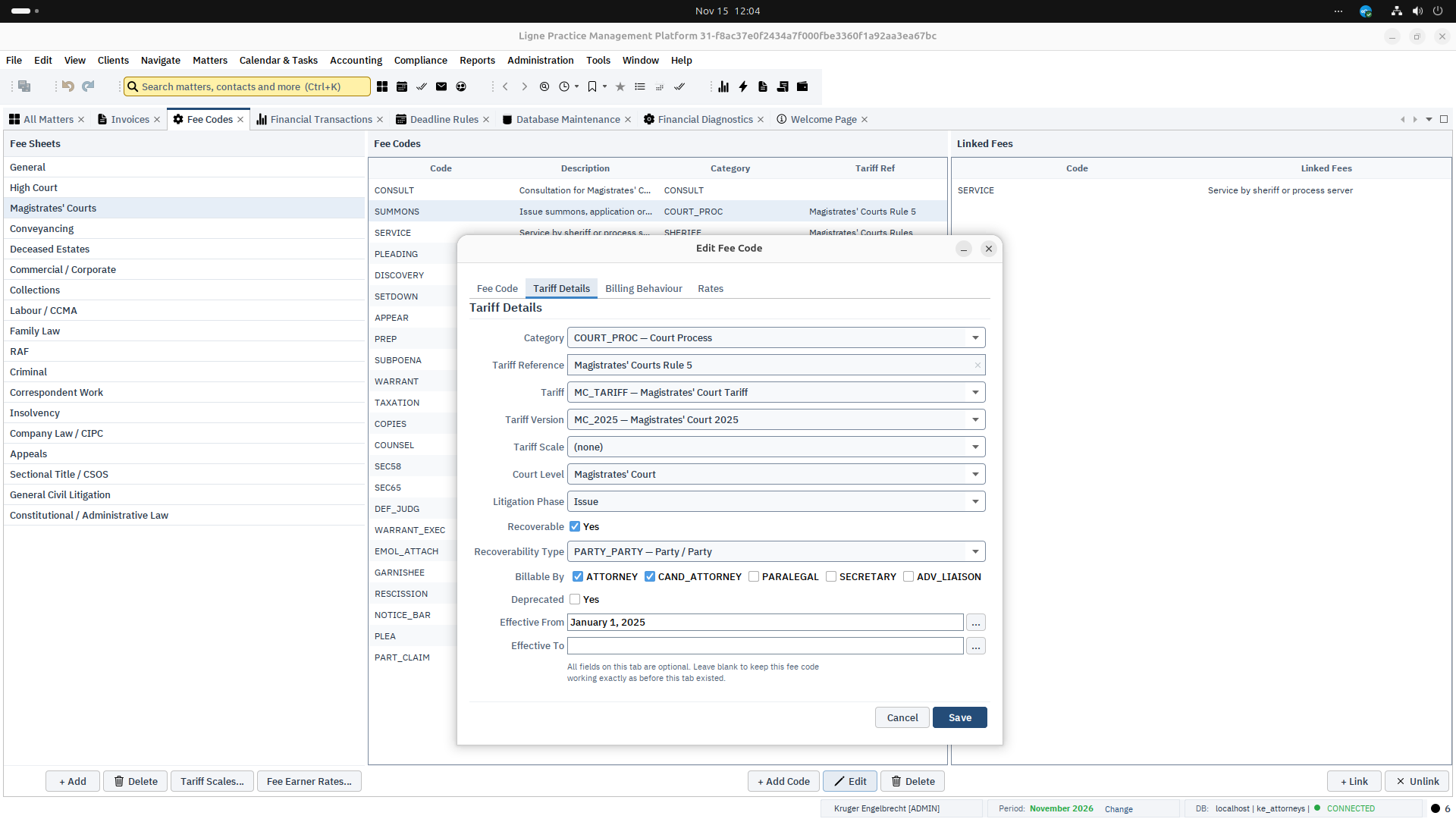
The debtor module manages the collection of debts owed to the firm or on behalf of its clients, from the first demand through payment plan, judgment and enforcement to settlement or write-off. Every rand is tracked in its own bucket, and money paid into trust by a debtor flows into the debtor ledger without re-keying.
Capital, costs, interest, commission, VAT, disbursements and suspense are tracked separately, so you can always show what a payment was applied to.
When a debtor pays into trust, the receipt is mirrored into the debtor ledger in the same transaction. It reduces the debt only once it is allocated, and reversing the trust receipt unwinds it.
Interest stops accruing at the in duplum cap and the cap is reset on judgment. Every cap event is logged, so the position can be shown to a court.
Instalment schedules with missed payments moving the account into arrears, and a formal default when the arrangement fails.
Record judgments, issue writs and record their returns. Write off a debt when recovery fails, with the reason on file.
Settlement quotes with interest brought up to date, age analysis across the book, and debtor and recovery dashboards for supervisors.
The conveyancing tab on a matter follows a South African transfer from instruction to completion. The stage moves only through a guarded step, the documents that expire are watched, and the money side is kept beside the trust position it depends on.
A stage moves one step at a time, and registration needs the lodgement and registration dates and the title deed number. Anything else — backwards, skipping a stage, or going on with a prerequisite outstanding — needs a specific permission and a reason, and every move is kept in the stage history.
Duty comes from SARS tables held as dated rows and chosen by the sale agreement date, in exact decimal arithmetic. A sale on which VAT is levied carries no duty. A table is marked unverified until an attorney confirms it against SARS.
Rates and levy clearances, the purchaser’s bank guarantee and the seller’s bond cancellation figures are tracked with their dates. A login alert lists those about to lapse or still not received.
The matter can move on when every contact of the client has a verified, unexpired FICA record, or when an attorney records a dated confirmation with a note of what was verified.
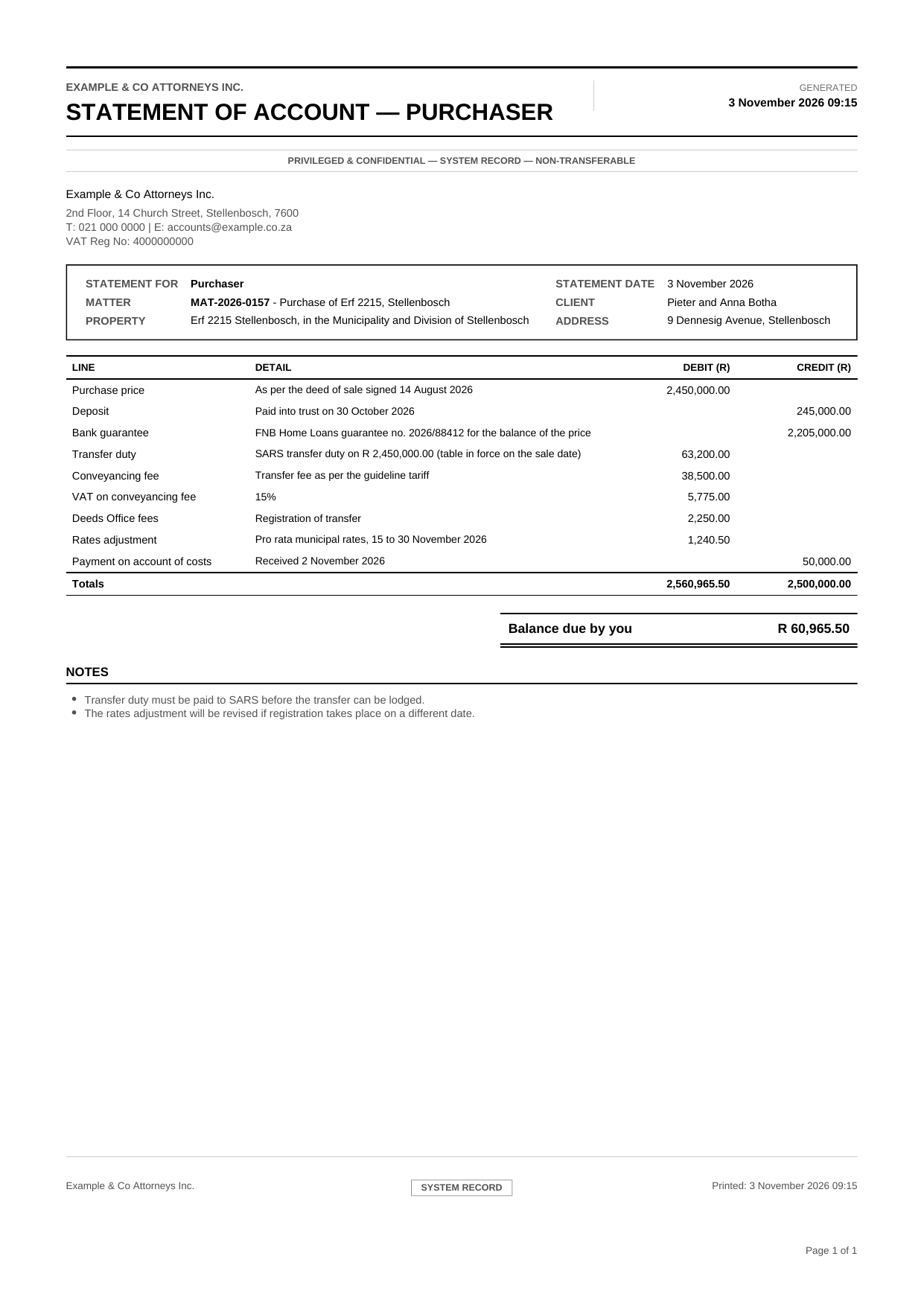
A statement of account for the purchaser and for the seller is worked out from the figures already on the matter, with any lines added by hand, and prints as a PDF.
The bondholder, the estate agent and the seller’s net proceeds are paid by linking each item to a real trust payment of the matter. A reversed payment re-opens its item, the trust position shows held, reserved and available against what is still to pay, and the matter cannot be completed with a payout outstanding.
Closing the month is where trust accounting is proven. Ligne takes you through the steps in order for each trust bank account, and will not close a period while a trust reconciliation is still outstanding.
| Line | Amount (ZAR) |
|---|---|
| Closing balance per bank statement | 250 000.00 |
| Add outstanding deposits | 12 000.00 |
| Less outstanding payments | −7 500.00 |
| Expected ledger balance | 254 500.00 |
| Trust ledger balance | 254 500.00 |
| Variance | 0.00 |
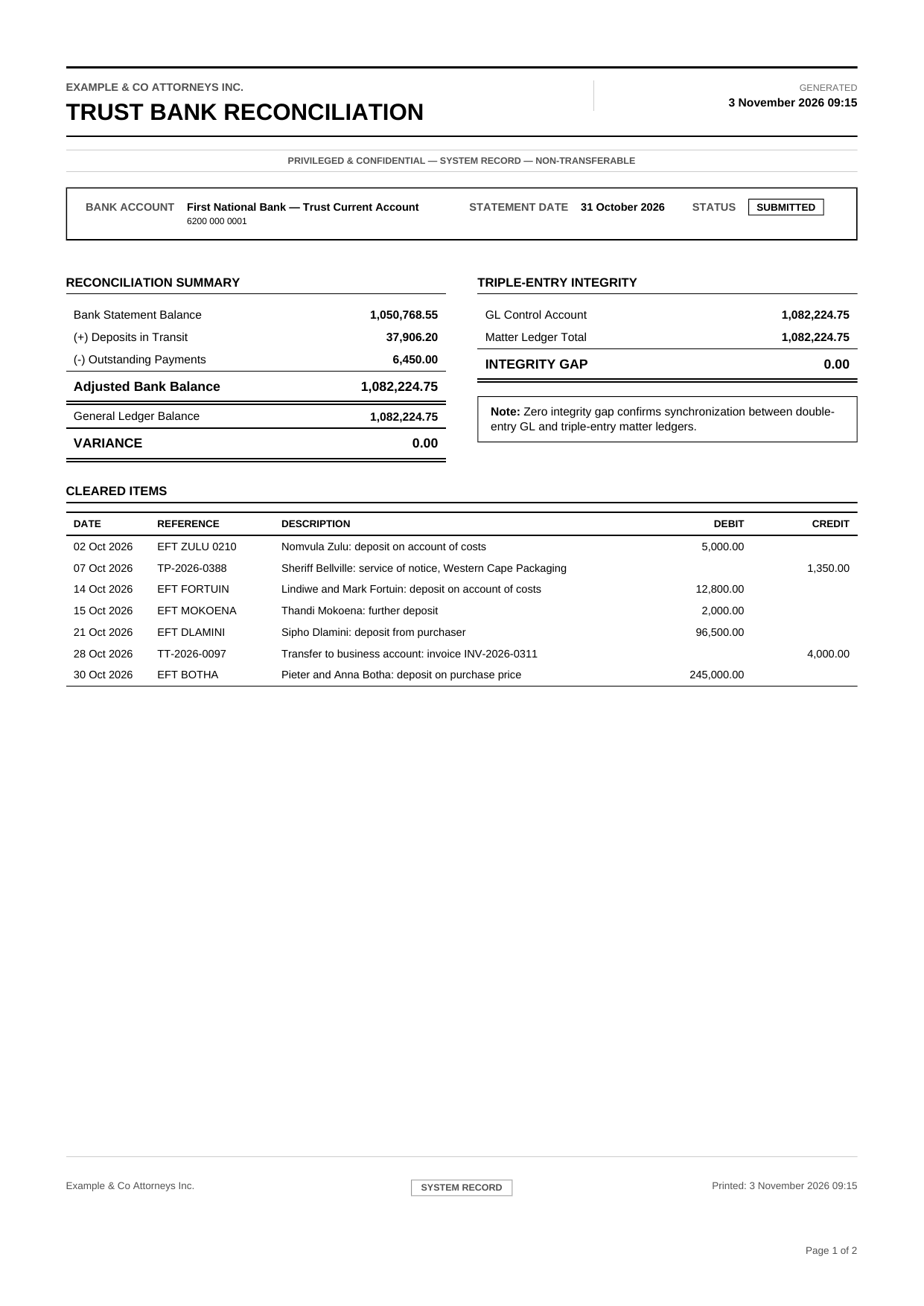
Existing contacts, clients and matters come into Ligne from Excel workbooks, and the same workbooks can carry your data back out.
Contacts, clients and matters each have a workbook template, in a full or a lite version. Export can include the data already in the system.
Validate a whole workbook without writing anything. Problems are reported by sheet and row number, so they can be fixed in the file.
Update existing records when identifiers match, or skip rows that fail and carry on. Progress is shown while the import runs.
Moving onto Ligne means carrying your closing balances over exactly. Opening balances are entered once, checked before anything posts, and posted as a single transaction across the general ledger and the trust ledger.
| General ledger | Debit | Credit |
|---|---|---|
| 1200 Operating Bank Account | 85 000.00 | |
| 1300 Accounts Receivable | 40 000.00 | |
| 2200 Accounts Payable | 25 000.00 | |
| 3400 Partner Capital Account | 100 000.00 | |
| Difference 0.00 | 125 000.00 | 125 000.00 |
| Trust per matter | Trust bank | Amount |
|---|---|---|
| Matter A | 1100 | 20 000.00 |
| Matter B | 1100 | 12 500.00 |
| Total | 32 500.00 |
Ligne runs on a single workstation, an office server, or private or cloud infrastructure the firm selects. The firm chooses where its data lives. There is no vendor-hosted multi-tenant service.
Historical client and financial records stay available whatever happens to support arrangements.
The practice keeps working through an internet outage or a vendor’s service disruption.
The firm holds its own database and matter-linked email archive, not a vendor-mediated export.
Sensitive client information is not routinely replicated across third-party hosted services.
Compliance controls are built into the accounting engine wherever practical.
| Framework | Area addressed |
|---|---|
| Legal Practice Act 28 of 2014 | Trust account separation, Section 86 trust accounting, interest handling, Fidelity Fund reporting |
| LPC Rules | Trust creditors, reconciliations, auditor reporting, trust integrity requirements |
| Income Tax Act | PAYE, UIF, SDL, ETI, IRP5, EMP201, EMP501 |
| Companies Act | Corporate client compliance and company secretarial tracking |
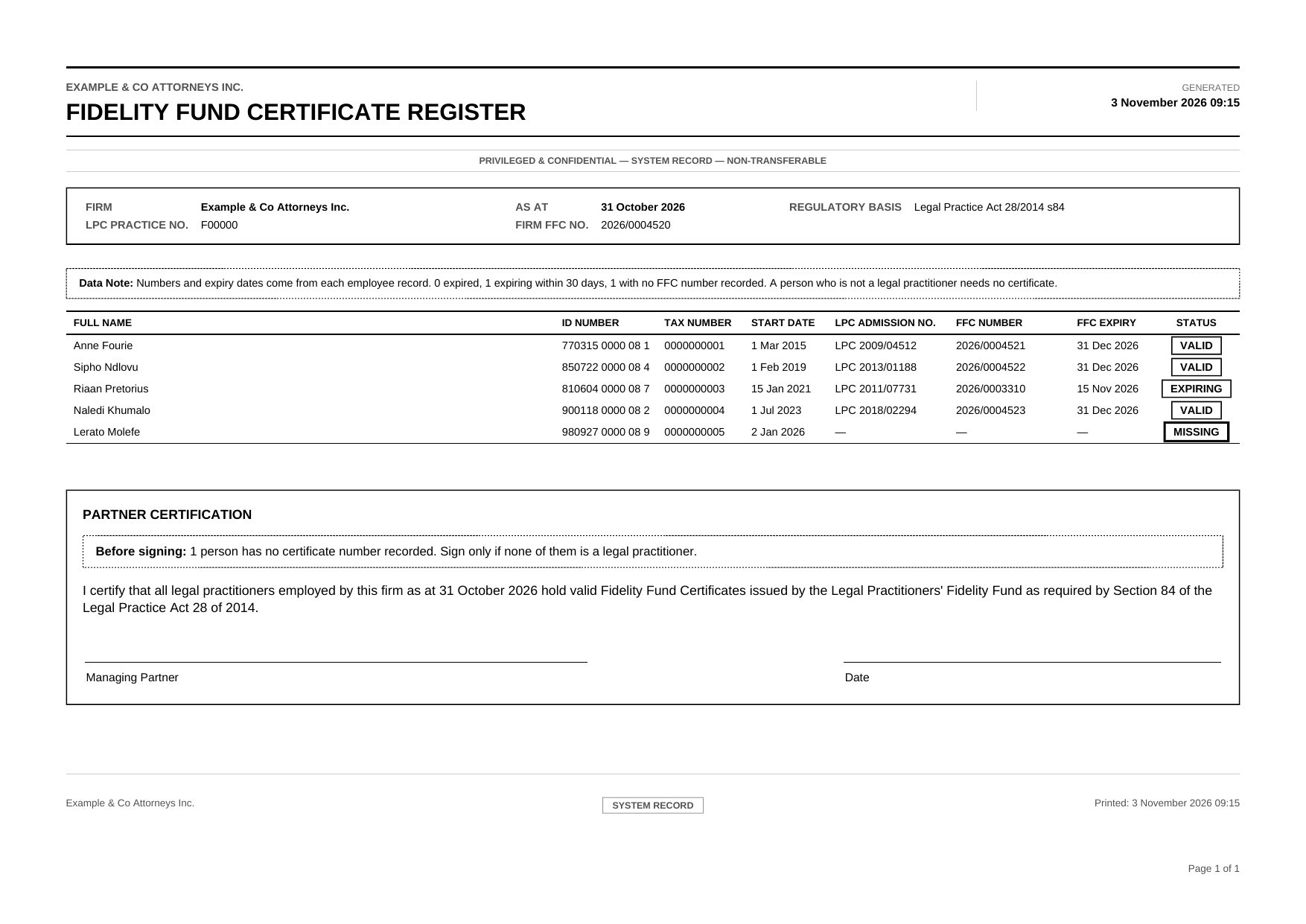
Each firm holds its own records. That limits how far any single incident can spread, and leaves the firm in control of how its data is protected.
Every installation has its own database. There is no shared service holding many firms’ client, estate and trust records.
Installations share no database, hosted back end or credentials, so an incident at one firm does not reach another.
There is no vendor-side data store to subpoena, sell, leak or train on.
A desktop client talking to a firm-controlled PostgreSQL database has no public web application to probe and no browser session to hijack. The product needs no public internet endpoint.
Permissions are checked in the service layer, not only on screen, and every financial event leaves an immutable audit trail.
Salted BCrypt password hashes under a 12-character policy, an encrypted database connection password, and optional TLS for connections.
Patching is built in. Releases arrive through the NetBeans Platform’s update mechanism from the firm’s configured update site. Only changed modules are downloaded, and updates are digitally signed. No system is immune to attack, and a firm remains responsible for securing its own servers, workstations, backups and staff access.
Who may do what is decided by roles and permissions held in the database, and it is checked where the work is done, not only where the button is.
Every permission the application checks is declared in a single registry. A permission that is not declared does not exist, and startup checks the database for any unknown ones.
Users hold roles, from system administrator to paralegal, and individual grants and denies can sit on top. A deny wins, and anything not granted is refused.
A window needs permission to open and checks again as it opens. Every sensitive action is checked again in the service layer, so hiding a button is never the only control.
A firm-set inactivity timeout warns before signing a user out. Password resets issue temporary passwords, and user administration is logged.
Ligne is a true desktop application. Every screen is a window you can dock beside others, drag into a new position, float on its own or maximise to fill the screen, and your layout is remembered between sessions.
Every window follows the matter you have selected. Keep the matter workspace on one monitor and float the trust ledger, email or documents on another, and they stay in step as you move between matters.
Ligne is built from independent modules, and it is updated the same way. A fix to one module reaches every workstation as that module alone, without reinstalling the application or handling installers by hand.
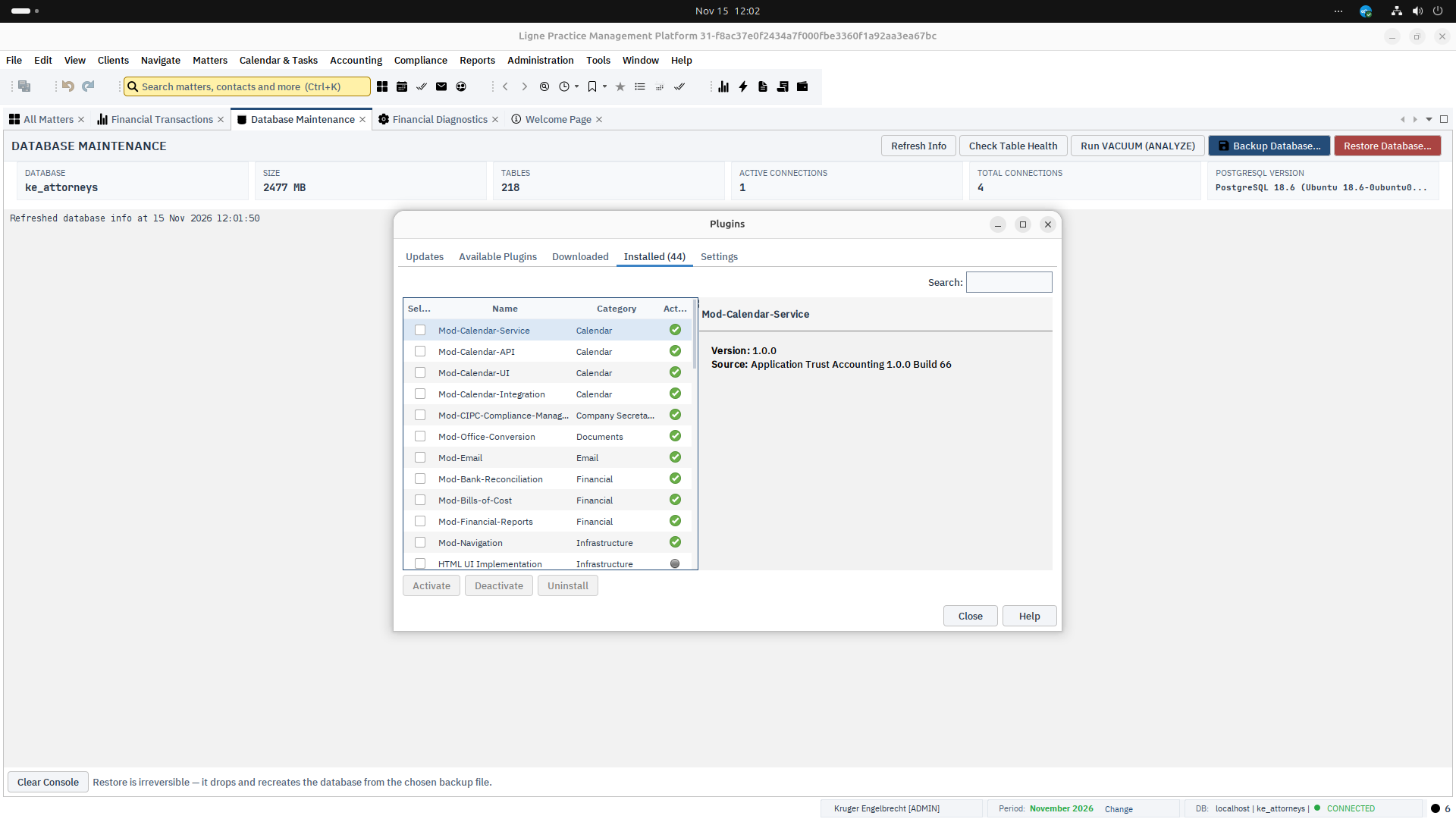
Ligne is not meant to be forked for each firm’s requirements. It is meant to be extended, and its module architecture enforces that: independent modules with controlled dependencies.
Shared services, database migrations and integration points give new modules a stable surface to build against, so new capabilities do not destabilise the ledger.
Trust accounting, general ledger, matter accounting, client and matter management, document and email integration, workflow, compliance reporting, the immutable audit trail, security and database infrastructure.
Bank reconciliation, debt and collections, bills of costs, conveyancing, CIPC and company secretarial, payroll, evidence and dossier management.
Firm-specific workflows, custom reports, specialised billing models, document automation, AI-assisted functionality, banking and accounting integrations, custom import and export, third-party APIs.
Ligne is built on the Apache NetBeans Platform, a mature modular desktop framework, so Ligne’s own code can concentrate on legal practice, accounting and trust compliance.
The result is a workstation application for sustained daily use: responsive, efficient to navigate and independent of a browser tab. Technology is chosen for stability and long-term support rather than passing trends.
Module and migration counts as at 11 November 2026.
Ligne is actively developed. Each month’s merged changes are summarised in a public development log, covering trust accounting, reporting, payroll, email and the document generator.
Ligne is proprietary, closed-source software, commercially licensed. A controlled platform keeps one consistent financial architecture and supported releases, and lets firm-specific work arrive as extensions rather than forks. Use, copying, modification and redistribution are subject to the applicable licence and contractual terms.
Installation, configuration and database setup, migration of existing records, onboarding, integrations with email, calendars, banking and document systems, and firm-specific modules delivered alongside the core platform rather than by modifying it. Customer requirements can feed into the core roadmap, an optional module, or a private extension.
ligne@krugerengelbrecht.co.za
To provide South African legal practitioners with a transparent, auditable and professionally engineered trust accounting and practice management platform, where financial integrity is enforced by design rather than assumed through procedure.
— Ligne Financial Software